Origin Story
So I had this idea. I thought it was pretty neat, and the best part? With today's AI it shouldn't take long. Too many projects are already dying in the proj drawer on my laptop. I knew this time had to be different. This one had to get finished.
After all those dead projects, I had two hard requirements for the next one:
- It has to be something I actually like.
- It cannot be too ambitious.
If that sounds trivial to you, good for you. I have wasted a lot of time building things I thought were needed, even when they were really boring to work on. The logic was always the same: AI can do it, someone needs it, so let's build it. That logic falls apart the moment the AI gets stuck and needs my attention after a long day at my actual job.
And when I did find something that excited me, it was too big. Even for today's most sophisticated models.
So this time, all of that was going to change. I had something I liked. The idea excited me. It needed serious tech, and it sounded like the top models could solve it in a few days. YAY!
The Core Concept
Simple. You start with a painting. You explore it by panning and zooming, and when you reach a place nobody has ever visited, a generative image model is called to paint it. Bit by bit the world grows into a huge canvas, and when you reach the edge of it, you just keep going.
Because generative AI takes inference time and costs real money, it had to be a shared, collaborative world. The first explorers don't see much, since almost nothing has been discovered yet, but they get to claim the top-level places, the ones everybody passes through. The deeper you zoom, the fewer people will ever see that spot, so the early land is the prime real estate: you name it, and your name stays on it. Late arrivals get the opposite deal. They walk into a huge world that is already full of other people's discoveries.
And so it was decided: a shared, collaborative, neverending painting. That's it. A weird project with no conventional "utility". It's not a SaaS tool, it's not a productivity app, it's not educational, and it's not quite a game. It is simply a shared map that expands forever into the unknown. For some reason, that excited me.
I'm not a novice. I've been in the dev business for more than 20 years, so I know that having the idea is the easy part and that finishing is the hard part. But this one seemed doable. Sure, I would need the expensive model to solve some of the border and concurrency problems, but doable. And even if no real users ever showed up, I'd at least have something fun to show my kids. Small downside. Yep, let's go.
The Naive Architecture
A quick search confirmed nobody had built this specific multi-resolution collaborative canvas. I drafted a name and the core product mechanics:
- Google Earth style deep-zoom navigation: pan, zoom, keep zooming.
- Explorers enter the world, see what others have already discovered, and when they reach the edge of the known world, they can discover new land.
- Those newly generated pixels belong to the discoverer. They can name the place, share a permanent link to it, and feel a healthy sense of pride and glory.
- The catch: AI image generation costs real money. I'm a solo dev with three little boys and a hefty mortgage; I can't sponsor unlimited generations for the entire internet. So every new explorer gets 3 free discoveries ("Pigments"). If someone enjoys exploring, they can buy a handful of extra pigments, which is essentially buying me a coffee in exchange for more canvas.
Pleased with myself, I rolled up my sleeves and started talking to Fable and Sol. With today's AI, I can probably ship it after 3–4 prompts.
Stack-wise I went fully vibe-coded and let the model pick its own tools. I only asked it not to use Node (sorry, not sorry). It landed on React and TypeScript in the browser, Python and FastAPI on the server, and OpenSeadragon for the pan and zoom tiling.
- Pay Google / integrate the image generation API
- Make sure the core zoom loop works on the canvas
- Sign in / register with Google OAuth
- Discoverer profile, balance, list of discovered places
- User payments
- Deploy to Vercel
- Fix the concurrency and neighbouring-image bugs
- Polish (and a logo, of course!)
- Security checks
- Friends & family beta test
- Launch & monitor
Reality Check #1
The First Zoom & The Moon Seam
Tokens flew through the air, files materialized across the workspace, and that intoxicating late-night LLM magic was in full effect. A working prototype appeared on localhost.
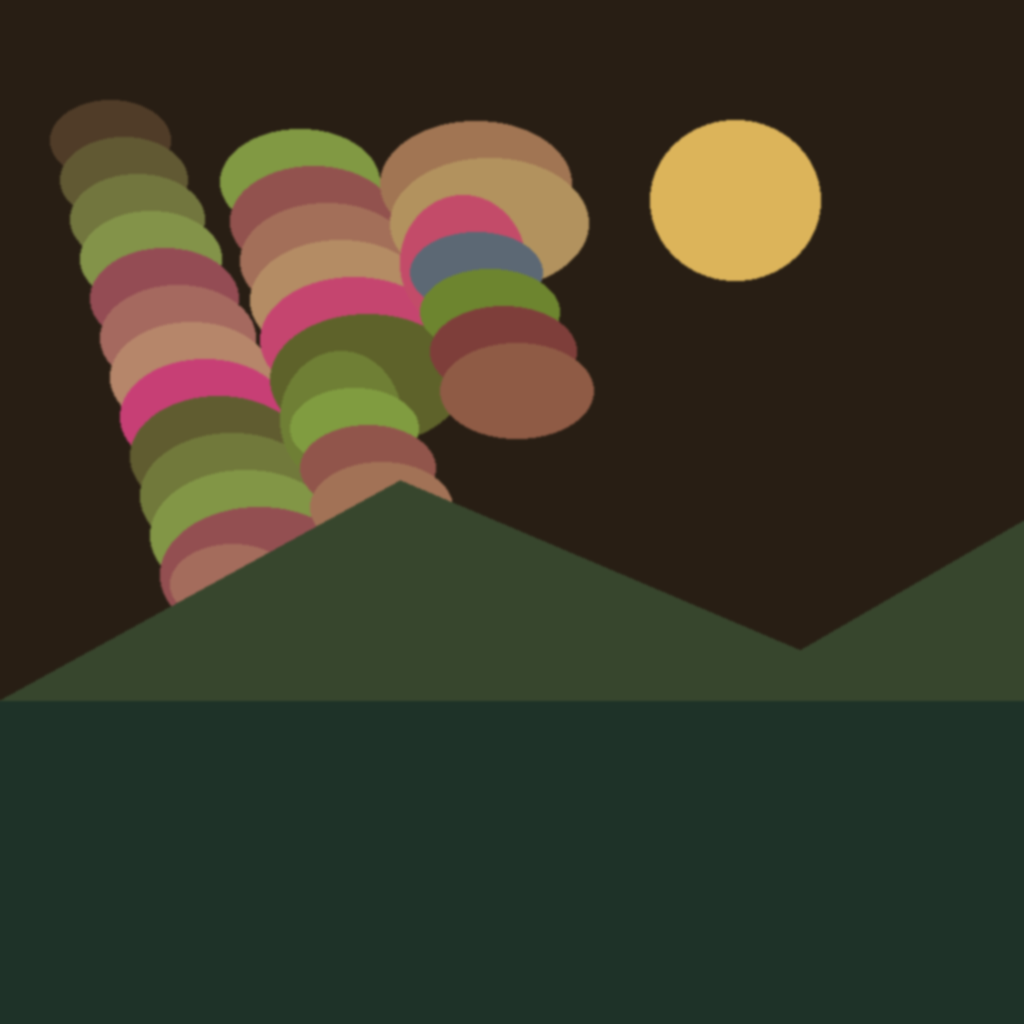
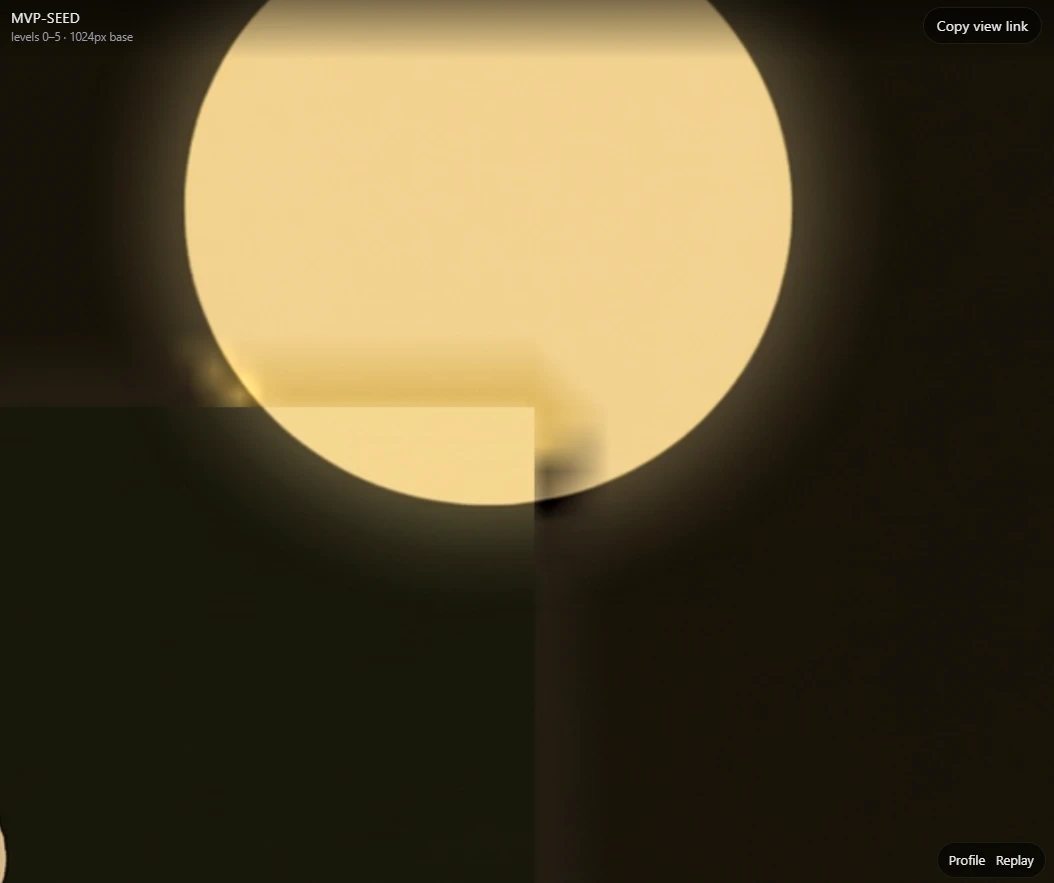
I loaded the seed image, an abstract vector landscape with dark mountains and a golden moon, moved the canvas around, zoomed in on the moon and clicked discover. A spinner appeared. And kept spinning for a couple of minutes. (Most of that, I found out much later, was my dev machine patiently waiting on a network route that did not exist.)
While waiting, I naturally wandered off across the canvas to see other parts of the world. When the generation finally finished, I was completely lost in a different quadrant. I spent two minutes just panning around, trying to find the square of land I had generated.
Found it. The new tile had cut a flat, 90-degree corner straight through the round moon, with a halo that matched nothing around it:
I did expect this class of bug, and I even warned the model about it up front, but it turned out to be much harder to fix than just telling Fable to fix it.
It became a loop: test, prompt, test, prompt. And every time it looked fixed, something else broke and earned another prompt. I tried telling the model to run it and check for itself, but it could not tell a good result from a bad one without me. It can see the image perfectly well. It just doesn't know what "wrong" looks like here.
Reality Check #2
Seams, Outpainting & The Hybrid Pipeline
Discovering a sector next to an existing one looked dreadful. In our diagnostic log (SEAM_CONTINUITY.md) we, and by "we" I mean the AI agents alone, measured the colour disagreement right at the boundary: a peak step of 75.7 per pixel, with the drift growing from 13.7 to 28.4 across the band next to the join. In plain words: a visible scar running down the middle of the painting. No amount of prompt engineering on a single model resolved it.
Eventually the AI suggested bringing in FLUX.1 Fill, which is good at a completely different job. Instead of inventing a picture from scratch, you hand it the existing image with a hole punched in it, and it paints only the hole, matching the edges it can already see.
The Hybrid Generation Routing Pipeline
← swipe to see the full diagram →
Figure 1: Hybrid routing decision tree. Virgin land gets creative Gemini synthesis; frontier land touching existing pixels gets conditioned FLUX.1 inpainting with Gaussian boundary tone locks.
Reality Check #3
Fable & Sol Out, Gemini In
By this point it was obvious this was not going to be a weekend project. Every fix needed more prompts, and every prompt needed more fixes.
It was a decision point. This is a genuinely time-consuming project, and time is the one thing I don't really have. But it is fun, and I would get to learn exactly where the latest tech shines and where it falls apart. So this time I'm going all the way.
Unfortunately, I don't have the budget to keep running Fable and Sol at that pace, so I needed a new plan. Gemini 3.7 Flash had just been released, and I decided to give it a try.
It wasn't bad. I could work with it. I still needed Fable for the hard planning and for reviewing big changes, but Flash was blazing fast and it did nicely. Soon after, 3.8 Flash was released, and wow, it was (and still is) actually good. In Antigravity you get fast mode for free, as of today: really fast, really cheap. I ran loops of agents in parallel and still had tokens to spare. It is still not Fable and it is not Sol, but I found myself reaching for them less and less, because Gemini got the job done.
Reality Check #4
The State Machine & The Lost Explorer
Fixing the art revealed the distributed-systems nightmares lurking underneath:
- The concurrency collision: what happens when two explorers try to discover the exact same frontier in the exact same second?
- The freezing camera: if generation takes 15–25 seconds, locking the explorer's camera behind a modal spinner (my original fix for people getting lost) is agonizing. But if you let them roam freely, where does their new land go when it finally arrives?
- The orphaned token: if an explorer closes the browser tab mid-generation, do they lose their token? Does the server throw away pixels that just cost real API dollars?
I was really pleased with myself for designing the formal Territory & Ceremony state machine that solved this. (This time it was actually me being useful, finally.) The trick was to cleanly separate the machine's job, making pixels, from the human's job, owning them:
Territory State Machine Lifecycle
← swipe to see the full diagram →
Figure 2: The formal Territory State Machine. Pixels are generated and committed as fogged MATERIALIZED chunks before human ownership is committed upon client render-acknowledgment.
Because pixels land as MATERIALIZED and fogged before anyone claims them, an explorer who disconnects never wastes the money I already paid. The land stays in the world, ready for the next person who wanders in to claim it with zero wait.
And the explorer who wandered off across the painting while their generation was running? We built the Discovery Toast: a floating notification that pops up saying "✨ New Horizon Discovered! [Jump to Location]". One click glides the camera smoothly across the world, straight to their new landmark.
Reality Check #5
The 30-Bug Markdown Strategy
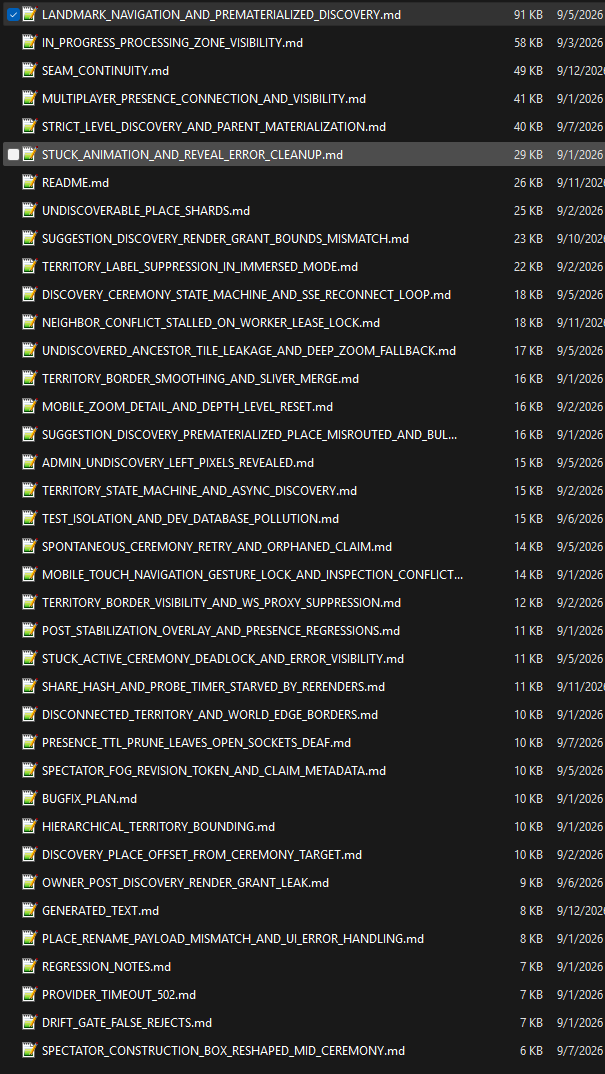
Figure 3: the actual docs/bugfix/ folder (30+ logs). Click to expand 🔍
Pretty soon I ran into regression hell. (I did crawl back to Fable. It didn't really help.) You ask the AI to fix a border glitch and it quietly breaks the deep-zoom level calculation. You fix the zoom, and the live presence of other explorers drops off.
Instead of letting the AI write a separate, isolated markdown document for every bug, I instituted a rule: related bugs (85%+ the same domain) must share the same living document.
Take a look at the screenshot: SEAM_CONTINUITY.md (49 KB), LANDMARK_NAVIGATION.md (91 KB), IN_PROGRESS_PROCESSING_ZONE.md (58 KB). Each file logs every symptom, every attempted patch, why the previous attempts failed, and the verified resolution.
When a new bug came up, I didn't say "fix this". I told the model: "Read docs/bugfix/SEAM_CONTINUITY.md first, understand what was already tried and why it broke, and do not repeat those mistakes." That single discipline ended the regression loops.
Next project, I'll slice it into its main features from the beginning, and give each slice its own markdown file for the AI to read when it needs it.
Reality Check #6
Infrastructure & The Payment Gauntlet
Apparently Vercel was not the right approach for me. Serverless functions cap how long a single request may run (10–60 seconds), keep memory tight, charge real money for bandwidth, and have no good answer at all for a long image pipeline or for the always-open connections that let explorers see each other move.
I moved to a Netcup VPS running Docker Compose (Caddy, four FastAPI workers, Redis 7, PostgreSQL 16, MinIO). Rock solid, blazing fast, and it costs a tiny fraction of the serverless bill.
I must say the AI did pretty well with the deployment itself. But I still had to work out what was best, compare prices, register, and run it. AI helps with all of that. It just doesn't take the time off your calendar.
The Payment Odyssey
I asked Gemini, and it said Stripe. It wrote everything that was needed while I did the paperwork. Apparently Stripe doesn't support my country without an expensive US entity setup.
- Next suggestion, Paddle: they support my country! I swapped the code, registered, and got a rejection:
"After evaluating the details provided, we have determined that we cannot move forward. This decision is final." That was strange, so I tried to understand why from a human in sales: "As a Merchant of Record... our Acceptable Use Policy prohibits Generative AI." - Dodo Payments: terms prohibited generative AI.
- PayPro Global, Lemon Squeezy, Creem: each one meant another round of registration and another evening reading the fine print. All of them either rejected me or turned out to be incompatible with virtual currency, generative AI, or both.
- Xsolla: finally! My country, the game mechanics, the virtual currency ("Pigments") and the generative AI were all acceptable to them. But why should it be easy? They had questions about the project (which probably did look suspicious from the outside), asked for my physical address, reviewed the site, and every email took days.
Weeks of calendar time. Almost no code.
Adding Personality & Human slop
When you discover a place you unlock perks and titles. That is eventually what makes the game feel like a game. I tried to pour my own personality into that text and, yet again, those things take time. I must admit I ended up asking Gemini for help with some of it. Without that, the project would have slipped another month.
Creating this file, only this small info file takes more than day or two, if you want to write it old fashion way
The Logo, The Loading GIF & "Found a World"
From the very beginning I knew exactly how I wanted the logo to look: vintage, low detail, Fallout 3 style, with a magnifying glass. But no matter how hard I tried, or which model I used, I couldn't get it right. In the end I found something I like, even though it isn't what I originally had in mind. I also created a custom animated loader (loading.webp) for tiles that are still rendering. It looks great at full resolution. I know you can barely make it out at icon size, but even then it holds a nice shape:
Along the way, two new features came to life surprisingly easily:
- Discoverer prompts: explorers can type their own text before uncovering a tile ("In this specific location, the explorer discovers: ..."), directing the AI's imagination.
- "Found a World": explorers can upload their own seed image and spawn an entirely new infinite painting for the community to explore. That whole feature took only a few focused prompts.
Where AI Excels: The Math Under the Hood
Even this took more than one or two prompts, because the hierarchical coordinate math is fiddly. But this is the part where the model genuinely shines, so for this section I'll just let it show off. (Not a programmer? Skip straight to the epilogue, this one is the engine room.)
Epilogue: Why Does It Still Take So Long With All This AI Of Yours?
Lots of bugs Point 7 at roadmap was a single line, "fix the concurrency and neighbouring-image bugs", sitting between OAuth and the logo. That one line became the project. docs/bugfix/ holds more than thirty post-mortems, and three of them alone come to nearly 200 KB of symptoms, failed patches and retries. The first working version of almost every feature arrived in an evening. Everything after that was me finding out what was wrong with it.
And the bugs were slow because the model cannot tell a fix from a break. It painted a square corner through the moon and had no idea anything was wrong. It could produce a candidate fix in seconds, but not tell me whether the fix worked, so every single round trip came back through my eyes. Machine-speed generation, human-speed verification. That gap is the whole bottleneck, and no bigger model closes it.
The bugs that mattered were not prompt problems at all. The seam took a second model doing a different job. The lost explorer took a state machine separating making pixels from owning them. You do not prompt your way to either of those, you decide them.
Memory and understanding helped: Fix the border, break the zoom. Fix the zoom, lose the presence. That loop only ended once the bug logs existed and the model was told to read them before touching anything. Most of my "prompt engineering" turned out to be writing things down.
And a stubborn tail was never code at all. Comparing hosts, seven payment providers, rejection letters, acceptable use policies, emails that take days, writing the lore in my own voice. AI helped with every one of those. It shortened none of them to zero.
So yes code is (almost) solved. It was just never the whole job.
Small Note For the Not-So-Technical Builders
AI gave the power to build and skip years of learning, but building an end to end project still require dedication and lots of hard work.
- Do not be afraid about technical stuff you do not understand from this post, just keep asking AI about how and why. Just command it to do, still does not enough.
- Think how to orginize his memory, telling him "we already talked about it" is almost useless. At least today.
Start exploring · 3 free discoveries →